 Brightstreet Group
.png)
OMOP Odyssey - Celebration (House of Hades)
Hades DatabaseConnector 6.4.0 now does IRIS stuff!
A well-deserved celebration 🎉 that OHDSI officially announced IRIS as a supported platform and dialect with DatabaseConnector 6.4.0 in the OHDSI Hades Project! Let’s showcase this accomplishment and create the OMOP CDM 5.4 on InterSystems IRIS, persona time!
Ms. TLS - I am running InterSystems Cloud Document (Health Connect Cloud or equivalent)
I have a running IRIS Cloud Document workload and managed to create the OMOPCDM54 DATABASE with minimal steps on my system, the Cloud Portal, and RStudio.
1. System Setup
However you import certs on your system, it needs to be done here to connect to InterSystems Cloud Document deployment. I use the following script loosely across solutions, where I paste in the cert I downloaded from the portal and it imports the cert for me.
import_iris_certificate.sh
#!/bin/bash
cat << 'EOF' > /usr/local/share/ca-certificates/cloudsql-gar2.crt
-----BEGIN CERTIFICATE-----
PEM FROM CLOUD DEPLOYMENT HERE
-----END CERTIFICATE-----
EOF

update-ca-certificates

PEM_FILE="/etc/ssl/certs/cloudsql-gar2.pem"
PASSWORD="changeit"
JAVA_HOME=$(readlink -f /usr/bin/java | sed "s:bin/java::")
KEYSTORE="$JAVA_HOME/lib/security/cacerts"
CERTS=$(grep 'END CERTIFICATE' $PEM_FILE| wc -l)

echo $KEYSTORE

# To process multiple certs with keytool, you need to extract
# each one from the PEM file and import it into the Java KeyStore.
for N in $(seq 0 $(($CERTS - 1))); do
  ALIAS="$(basename $PEM_FILE)-$N"
  echo "Adding to keystore with alias:$ALIAS"
  cat $PEM_FILE | awk "n==$N { print }; /END CERTIFICATE/ { n++ }" | keytool -noprompt -import -trustcacerts \
    -alias $ALIAS -keystore $KEYSTORE -storepass $PASSWORD
done
2. The Cloud Portal
This can be done alternate ways over the listener as well, but to highlight it can be done in the Cloud Portal, we can use the SQL Query Tools.
.png)
3. RStudio
Next step is RStudio, where the OHDSI packages will do most of the work after a little bit of setup.
install.packages("devtools")
devtools::install_github("OHDSI/CommonDataModel")
install.packages("DatabaseConnector")
install.packages("SqlRender")

Sys.setenv("DATABASECONNECTOR_JAR_FOLDER" = "/home/sween/Desktop/OMOP/iris-omop-extdb/jars")
library(DatabaseConnector)
downloadJdbcDrivers("iris")
We can check to see if the iris dialect (now included with OHDSI tooling) is actually in there.
CommonDataModel::listSupportedDialects().png)
Crowd goes wild, indeed IRIS is in there. I wanted to just dump the DDLs it creates to take a peek at them.
CommonDataModel::buildRelease(cdmVersions = "5.4", targetDialects = "iris", outputfolder = "./ddl/iris/")Inspecting our output folder:

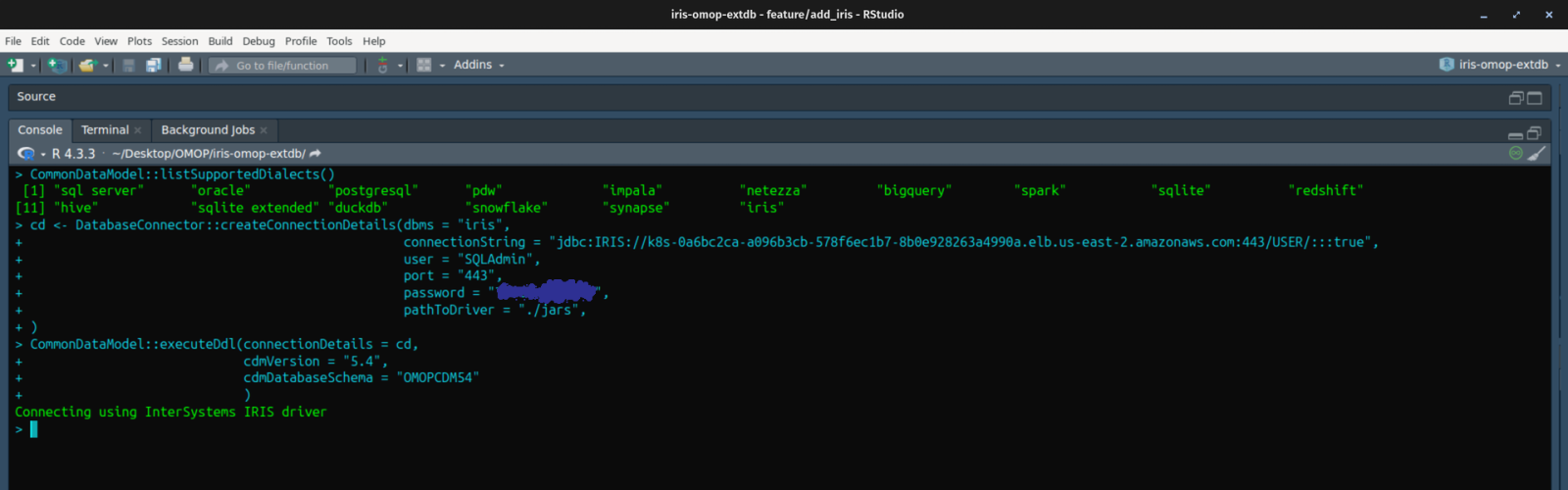
Now let’s target our InterSystems Cloud Document instance and actually create the OMOP database.
Connect:
cd <- DatabaseConnector::createConnectionDetails(
  dbms = "iris",
  connectionString = "jdbc:IRIS://your-cloud-instance:443/USER/:::true",
  user = "SQLAdmin",
  port = "443",
  password = "PASSWORD",
  pathToDriver = "./jars"
)
Execute:
CommonDataModel::executeDdl(
  connectionDetails = cd,
  cdmVersion = "5.4",
  cdmDatabaseSchema = "OMOPCDM54"
)
If everything goes well, no errors will be reported in RStudio.
Check your work on the InterSystems Cloud Document deployment. It’s empty, but it’s there!
.png)
👣🔫 Alert: In the CDM for IRIS, there is something to be aware of with a name collision of sorts with the “DOMAIN” table. In InterSystems SQL, DOMAIN is a keyword. You have to account for quoting the table name for operations.
for table in cdmtables:
    try:
        if table == "domain":
            sql = f'(select * from OMOPCDM54."{table}") AS temp_table;'
        else:
            sql = f'(select * from OMOPCDM54.{table}) AS temp_table;'
I’m in a hurry, and security is somebody else’s job
If you want the OMOP database on your local IRIS Community, Eval, Container, or POD, most of the steps apply above, just with a new connection string and creating the schema through the SMP.
.png)
Now back in RStudio again, point to the developer instance:
cd <- DatabaseConnector::createConnectionDetails(
  dbms = "iris",
  connectionString = "jdbc:IRIS://192.168.1.162:1972/USER",
  user = "_SYSTEM",
  port = "1972",
  password = "SYS",
  pathToDriver = "./jars"
)

CommonDataModel::executeDdl(
  connectionDetails = cd,
  cdmVersion = "5.4",
  cdmDatabaseSchema = "OMOPCDM54"
).png)
Connecting with nostalgic credentials… Now refresh the SMP and expand the OMOPCDM54 schema. Woooo!
.png)
🙌 🎉 Excellent work and shout outs for those involved in this effort!
.png)
OMOP Odyssey Series:
- OMOP Odyssey - InterSystems OMOP, The Cloud Service (Troy)
- OMOP Odyssey - FHIR® to OMOP ETL (Calypso’s Island)
💡 This article is considered InterSystems Data Platform Best Practice.