 Brightstreet Group

IKO Plus: Multi-Cluster, Cross-Regional ECP Database Access with Cilium Cluster Mesh on Google Cloud Platform
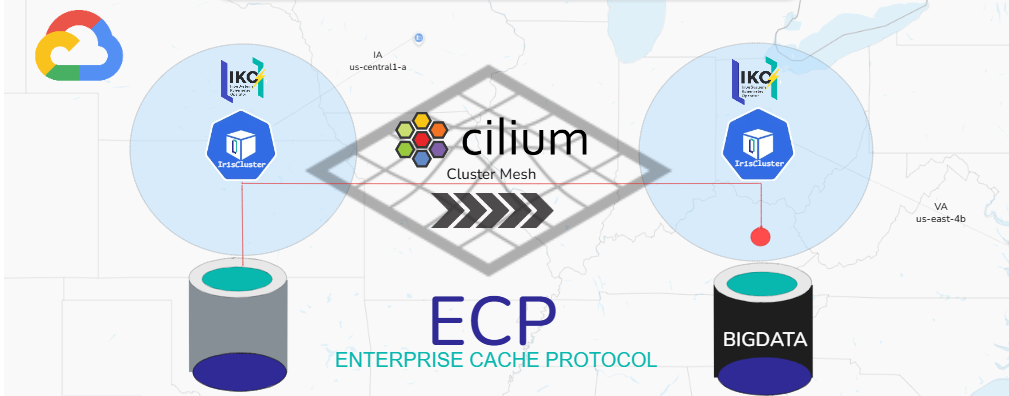
Virginia’s got BIGDATA in IRIS and Iowa wants it
This distraction, “Meshing IrisClusters” with Cilium ClusterMesh, provides database access using the Enterprise Cache Protocol (ECP) from the Eastern Seaboard of the United States to the MidWest on Google Cloud Platform. Ridiculously powerful setup for national/multi-national setups and though the use cases are a plenty, this particular one is a simple example on how to send ETL/ELT the unemployment office.
Toybox Shout Outs
There is some grown up stuff going on here, so lets call them out.
Google Cloud Platform - Most Powerful Software Defined Network on the Planet
Kubernetes- Using Canonical k8s, its a snap.
Cilium- Calling this “just” a CNI should be a crime
InterSystems Kubernetes Operator - Complex IrisCluster topologies done right.
InterSystems Enterprise Cache Protocol (ECP) - Real-time data across a network with minimal network overhead.
Implementation
Procedurally, we will implement in the following in order.
Google Cloud Network
Here we need to create a custom vpc, a pair of non-overlapping subnets, and a firewall rule to allow traffic between them.
A Custom VPC
gcloud compute networks create ikoplus-mesh-vpc \
    --subnet-mode=custom \
    --bgp-routing-mode=global
A Pair of Subnets, Regional!
# Subnet for Iowa
gcloud compute networks subnets create ikoplus-iowa-subnet \
    --network=ikoplus-mesh-vpc \
    --region=us-central1 \
    --range=10.0.1.0/24

# Subnet for Virginia
gcloud compute networks subnets create ikoplus-virginia-subnet \
    --network=ikoplus-mesh-vpc \
    --region=us-east4 \
    --range=10.0.2.0/24
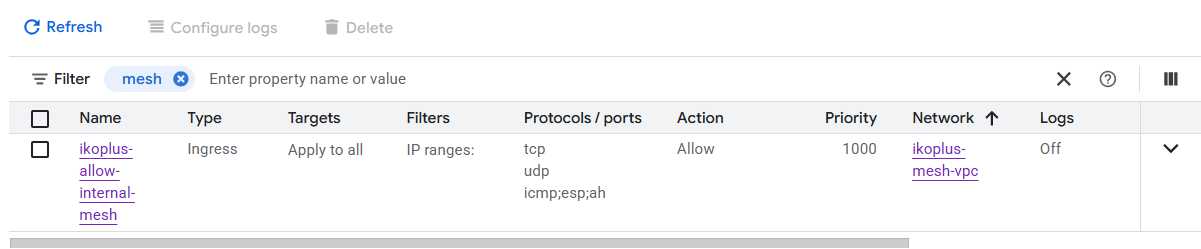
Firewall Rule Enables Traffic between the Two
gcloud compute firewall-rules create ikoplus-allow-internal-mesh \
    --network=ikoplus-mesh-vpc \
    --allow=tcp,udp,icmp,esp,ah \
    --source-ranges=10.0.1.0/24,10.0.2.0/24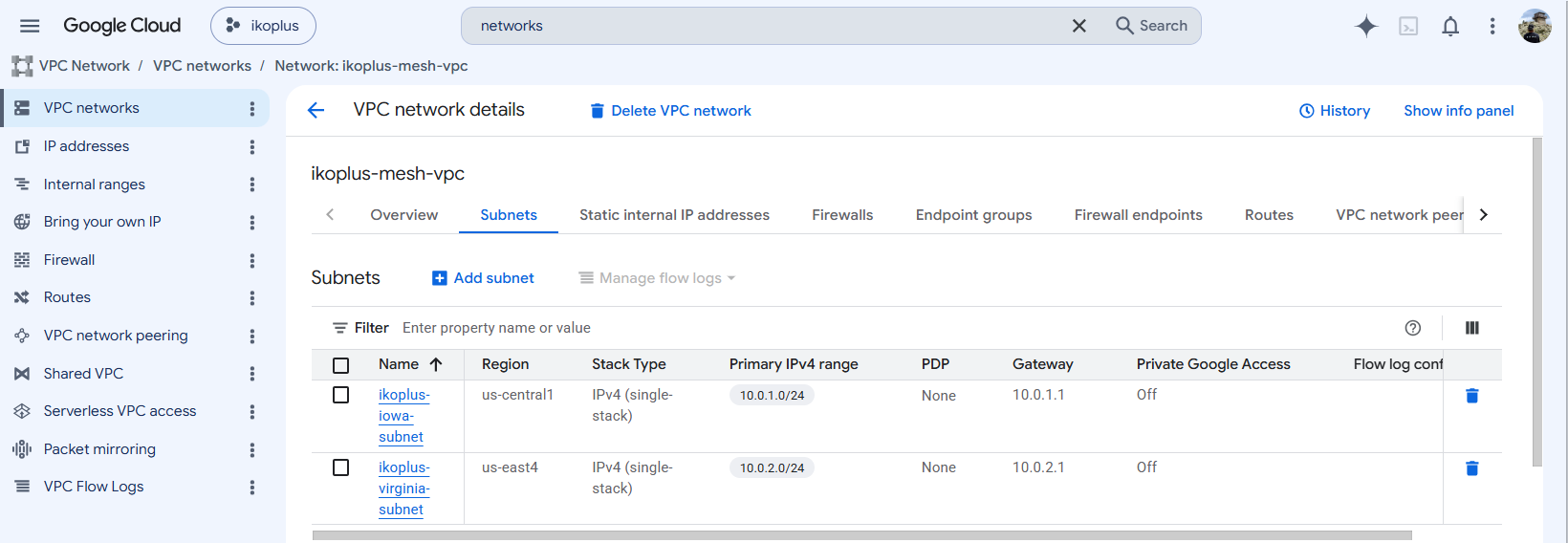
Google Cloud Compute
We need some nodes, going with two single node clusters, so lets back two and launch them into the respective regional subnets.
# Create the Iowa Node
gcloud compute instances create ikoecpmesh-iowa-node --zone=us-central1-a \
    --machine-type=c2-standard-4 \
    --image=ubuntu-2404-noble-amd64-v20250530 \
    --image-project=ubuntu-os-cloud \
    --boot-disk-size=100GB \
    --network=ikoplus-mesh-vpc \
    --subnet=ikoplus-iowa-subnet

# Create the Virginia Node
gcloud compute instances create ikoecpmesh-virginia-node --zone=us-east4-a \
    --machine-type=c2-standard-4 \
    --image=ubuntu-2404-noble-amd64-v20250530 \
    --image-project=ubuntu-os-cloud \
    --boot-disk-size=100GB \
    --network=ikoplus-mesh-vpc \
    --subnet=ikoplus-virginia-subnet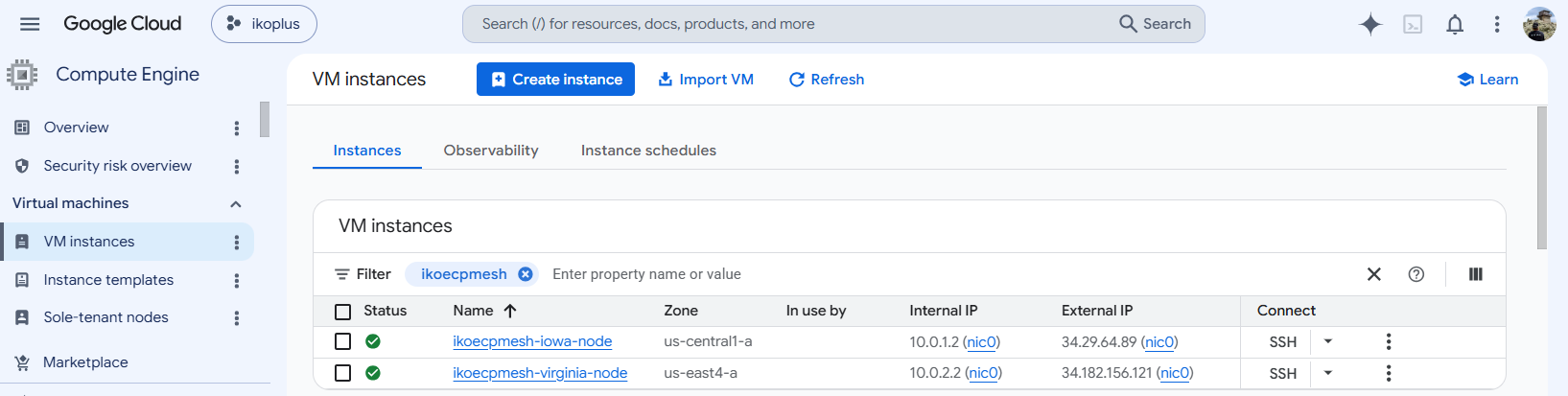
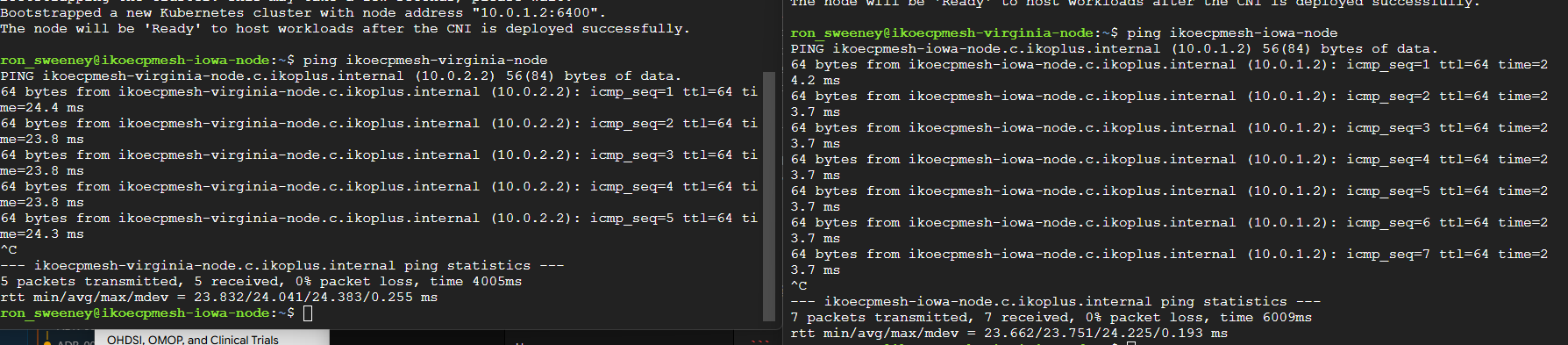
Lets confirm connectiity between those boxen before we move on…
Kubernetes
Onward here with Kubernetes install, for this we want to deploy it without a CNI and add Cilium later, even though Canonical k8s ships with it (as most do now).
sudo snap install k8s --classiciowa.yaml
cluster-config:
  network:
    enabled: false
  gateway:
     enabled: false
  ingress:
     enabled: false
 pod-cidr: "10.10.0.0/16"
 service-cidr: "10.152.183.0/24"
virginia.yaml
cluster-config:
  network:
    enabled: false
  gateway:
    enabled: false
  ingress:
    enabled: false
 pod-cidr: "10.11.0.0/16"
 service-cidr: "10.152.184.0/24"
The boostraps…
sudo k8s bootstrap --file iowa.yaml
sudo k8s bootstrap --file virginia.yaml
Two clusters, zero CNI’s.
Cilium
Cilium is our CNI, and we want to enable the ClusterMesh capability right out of the gate, so for this, its a good time to get our kubeconfigs in order and merged into a single one so we can use context variables.
kubectl config get-contexts
CURRENT   NAME               CLUSTER   AUTHINFO   NAMESPACE
*         iowa-cluster       k8s       k8s-user
          virginia-cluster   k8s       k8s-user
We will be deploying Cilium via helm, so here is the respective values files for the install on each cluster.
❗Important cilium clustername and id need to be unique across the mesh!
cilium-iowa.yaml
cluster:
  name: iowa-cluster
  id: 1

# Tell Cilium to use the Pod CIDR assigned to the Kubernetes Node
ipam:
  mode: kubernetes

clustermesh:
  useAPIServer: true
  apiserver:
    service:
      type: NodePort
cilium-virginia.yaml
cluster:
  name: virginia-cluster
  id: 2

# Tell Cilium to use the Pod CIDR assigned to the Kubernetes Node
ipam:
  mode: kubernetes

clustermesh:
  useAPIServer: true
  apiserver:
    service:
      type: NodePort
Now install the chart on each cluster, referencing the respective cilium values.
helm install cilium cilium/cilium \
  --version 1.16.0 \
  -n kube-system \
  -f cilium-iowa.yaml

helm install cilium cilium/cilium \
  --version 1.16.0 \
  -n kube-system \
  -f cilium-virginia.yaml
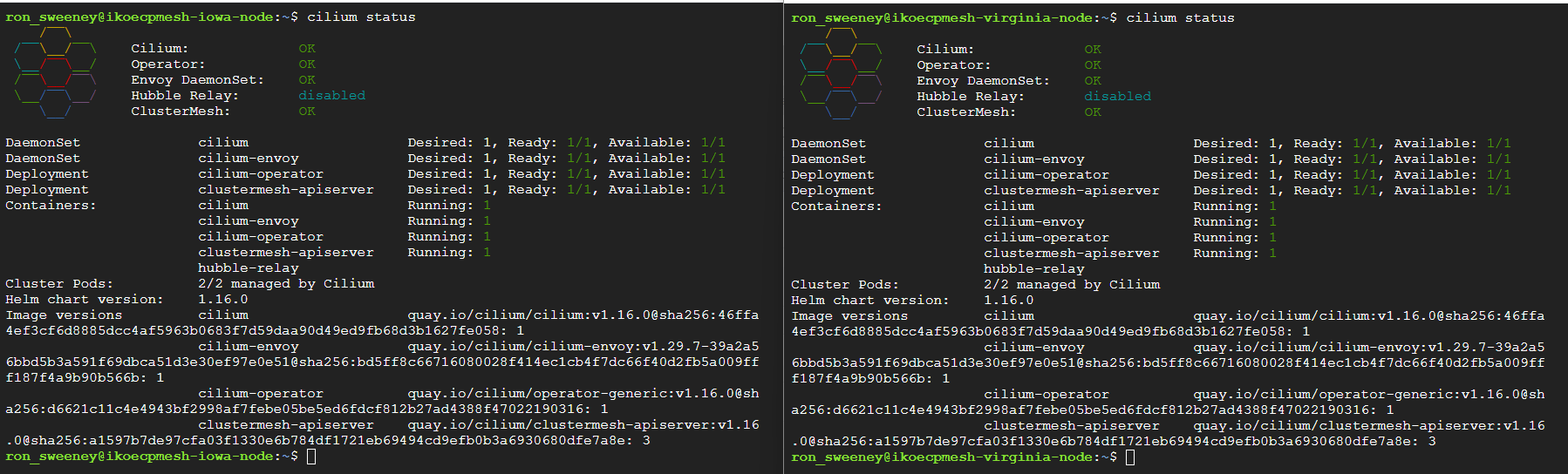
Now, lets check out our work… ✅ Pods look good

✅ Cilium looking good too!
⭐Connect Clusters!
This is the slight of hand Cilium provides to make a service span across clusters, and its a single command.
cilium clustermesh connect --context iowa-cluster --destination-context virginia-cluster --allow-mismatching-ca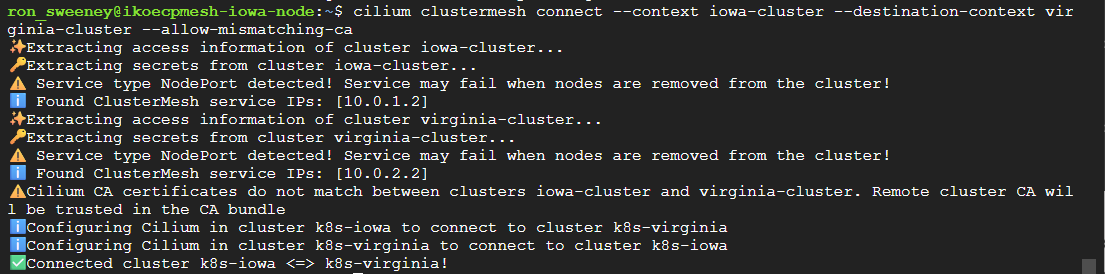
✅ Connected?

Totally Rad!
Here is the snapshot of CIDR’s now that we have completed the groundwork to deploy the workload.
| Network Layer | Cluster 1 | Cluster 2 | Managed By |
|---|---|---|---|
| Node / VM IP | 10.0.1.x | 10.0.2.x | GCP VPC Subnets |
| Pod CIDR | 10.10.0.0/16 | 10.11.0.0/16 | K8s Installer (bootstrap.yaml) |
| Service CIDR | 10.152.183.0/24 | 10.152.184.0/24 | K8s Installer (bootstrap.yaml) |
Workload
So we are finally at the InterSystems IRIS Implementation, we need the operator and a pair of IrisClusters.
IKO
Straight forward vanilla deploy of the Operator
helm install iko . -f values.yaml
IrisClusters
Lets put a Simple IrisCluster in each region/cluster.
iowa
# full IKO documentation:
# https://docs.intersystems.com/irislatest/csp/docbook/Doc.View.cls?KEY=PAGE_deployment_iko
apiVersion: intersystems.com/v1beta1
kind: IrisCluster
metadata:
  name: iriscluster-iowa
spec:
  topology:
    data:
      image: containers.intersystems.com/intersystems/irishealth:2026.1
      webgateway:
        image: containers.intersystems.com/intersystems/webgateway-lockeddown:2026.1
        type: apache-lockeddown
        alternativeServers: LoadBalancing
        applicationPaths:
          - /csp/sys
        loginSecret:
          name: webgateway-login
  licenseKeySecret:
    name: iris-license-secret
  imagePullSecrets:
    - name: containers-pull-secret
  serviceTemplate:
    spec:
      type: LoadBalancer
      externalTrafficPolicy: Local
virginia
# full IKO documentation:
# https://docs.intersystems.com/irislatest/csp/docbook/Doc.View.cls?KEY=PAGE_deployment_iko
apiVersion: intersystems.com/v1beta1
kind: IrisCluster
metadata:
  name: iriscluster-virginia
spec:
  topology:
    data:
      image: containers.intersystems.com/intersystems/irishealth:2026.1
      webgateway:
        image: containers.intersystems.com/intersystems/webgateway-lockeddown:2026.1
        type: apache-lockeddown
        alternativeServers: LoadBalancing
        applicationPaths:
          - /csp/sys
        loginSecret:
          name: webgateway-login
      irisDatabases:
      - name: BIGDATA
        ecp: true
        directory: /irissys/data/IRIS/mgr/bigdata
      irisNamespaces:
      - name: BIGDATA
        routines: BIGDATA
        globals: BIGDATA
        interop: false
  licenseKeySecret:
    name: iris-license-secret
  imagePullSecrets:
    - name: containers-pull-secret
  serviceTemplate:
    spec:
      type: LoadBalancer
      externalTrafficPolicy: Local
These are simple, but the thing that is different Id like to call out is that Virginia is creating the BIGDATA database and namespace, where as Iowas is not.
      irisDatabases:
      - name: BIGDATA
        ecp: true
        directory: /irissys/data/IRIS/mgr/bigdata
      irisNamespaces:
      - name: BIGDATA
        routines: BIGDATA
        globals: BIGDATA
        interop: false
We now have an IrisCluster running in each of the regions/clusters.

⭐ Cilium Global Service
This is the magic! The thing to understand here, you need to create the same service, in both clusters, with the same name, and decorate it with the magic cilium annotations. Additionally, these need to be ClusterIP’s and target their own instance.
iowa
apiVersion: v1
kind: Service
metadata:
  name: iriscluster-ecp-service
  annotations:
    service.cilium.io/global: "true"
    service.cilium.io/shared: "true"
    service.cilium.io/affinity: "remote"
spec:
  type: ClusterIP
  selector:
    app.kubernetes.io/instance: iriscluster-iowa
  ports:
    - name: superserver
      port: 1972
      targetPort: 1972
virginia
apiVersion: v1
kind: Service
metadata:
  name: iriscluster-ecp-service
  annotations:
    service.cilium.io/global: "true"
    service.cilium.io/shared: "true"
    service.cilium.io/affinity: "remote"
spec:
  type: ClusterIP
  selector:
    app.kubernetes.io/instance: iriscluster-virginia
  ports:
    - name: superserver
      port: 1972
      targetPort: 1972
Apply those services into their respective clusters and lets start talking across the cluster mesh.
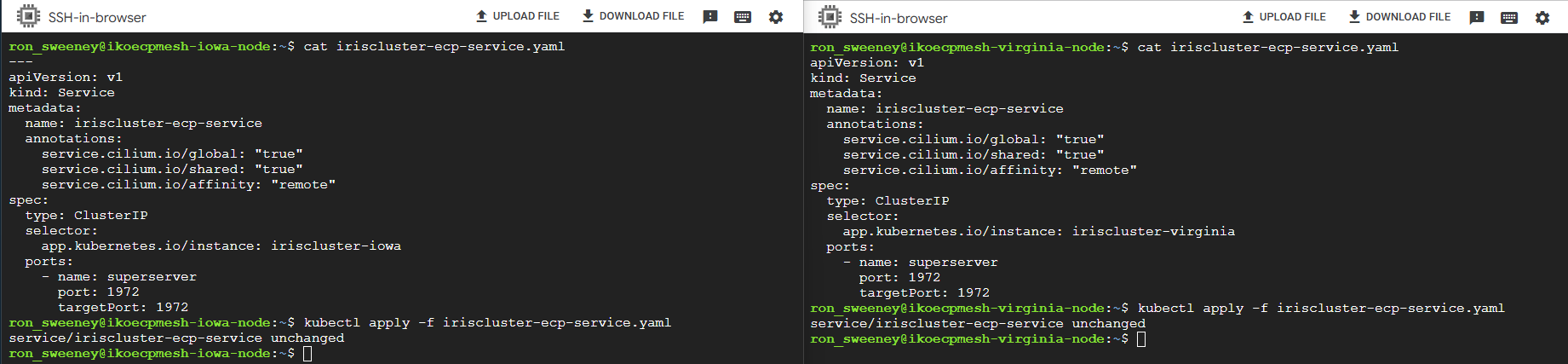
“iriscluster-ecp-service” is available for communication in each cluster now and can communicate over the mesh.
ECP
Now, for ECP, you do have to ensure that ECP is enabled in services on each IrisCluster.
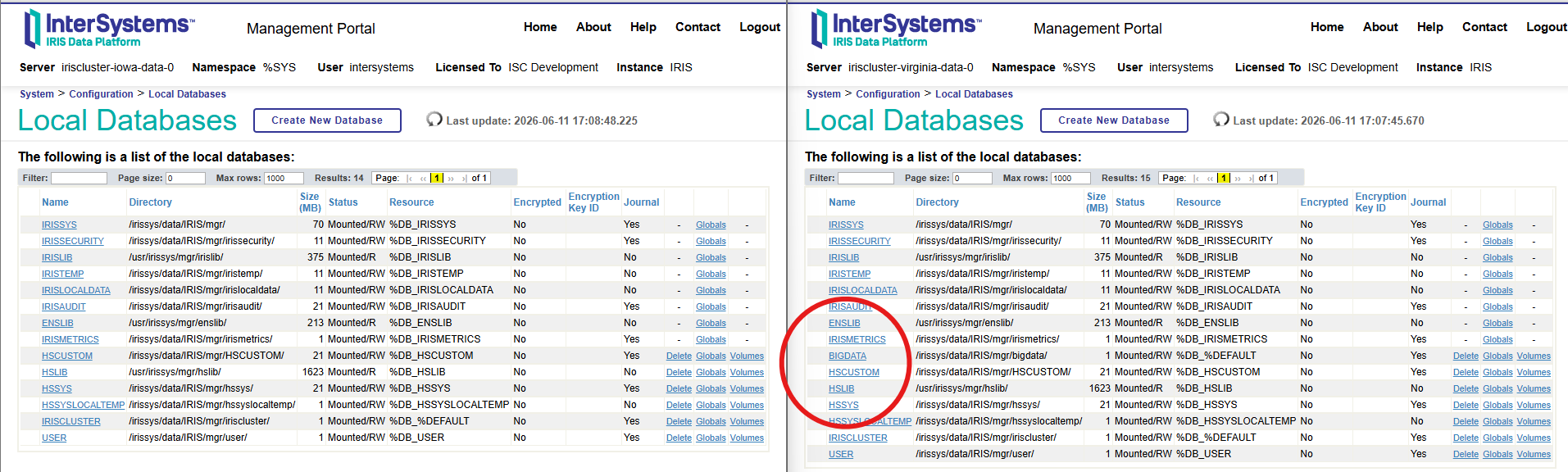
For Virginia, there is not much to do after that, but for IOWA, we are going to establish the remote database connectivity over ECP with a cpf merge file that mounts database BIGDATA across regions, and clusters, then creates a remote database in IOWA and slaps a namespace on it.
[ECPServers]
VIRGINIADATASERVER=iriscluster-ecp-service.default.svc.cluster.local,1972
[Actions]
CreateDatabase:Name=BIGDATAIOWA,Directory=/irissys/data/IRIS/mgr/bigdata,Server=VIRGINIADATASERVER,LogicalOnly=1
CreateNamespace:Name=BIGNS,Globals=BIGDATAIOWA,Routines=BIGDATAIOWA,SysGlobals=IRISSYS,SysRoutines=IRISSYS
Running the merge in IOWA…
irisowner@iriscluster-iowa-data-0:~$ iris merge IRIS gar.cpf
IRIS Merge of /home/irisowner/gar.cpf into /irissys/data/IRIS/iris.cpf
IRIS Merge completed successfully
Attestation
Lets see if we can load up some data in the BIGDATA database and BIGDATA namespace in Virginia using a simple routine.
ROUTINE ZECPTEST
ZECPTEST ; Test routine for ECP Job execution
    ; This routine logs the time it was executed
    SET ^ZECPLog($HOROLOG) = "Executed at " _ $ZDATETIME($HOROLOG,3) _ " " _ $SYSTEM.INetInfo.LocalHostName()
    QUIT
Node: iriscluster-virginia-data-0, Instance: IRIS
USER>zn "BIGDATA"
BIGDATA>Do ^ZECPTEST
BIGDATA>ZWRITE ^ZECPLog
^ZECPLog("67732,70690")="Executed at 2026-06-11 19:38:10 iriscluster-virginia-data-0"Not earth shattering, I know, but now, lets fly back to IOWA and see if we can execute and read the same data in namespace BIGNS and the remote database in virginia BIGDATA.
irisowner@iriscluster-iowa-data-0:~$ irissession IRIS

Node: iriscluster-iowa-data-0, Instance: IRIS

USER>zn "BIGNS"

BIGNS>JOB ^ZECPTEST|"^VIRGINIADATASERVER^/irissys/data/IRIS/mgr/bigdata"|

BIGNS>ZWRITE ^ZECPLog
^ZECPLog("67732,70690")="Executed at 2026-06-11 19:38:10 iriscluster-virginia-data-0"
^ZECPLog("67732,70887")="Executed at 2026-06-11 19:41:27 iriscluster-virginia-data-0" <---------- woooooo

BIGNS>
🎉
Foot Guns
Stuff I had issues with for full transparency.
- No idea why, but I was missing core-dns in my setup and had to add it (
sudo k8s enable dns) on both nodes. I think maybe the “network” stuff in the canonical k8s setup I took a little too lightly and assumed “just cilium.” - The certificates for cilium should match, though you can work around it to just accept the mismatch. For this I dumped the cilium-ca secret from iowa and loaded in virginia and re-established the mesh.
- Another network thing was that I had to patch the nodes with the podCidrs, at least I think so, once I did that cilium deployment rolled out a little more smoothly.
- Was missing a default storage class, added local-path-provisioner from Rancher and made it the default.
- The design for this use case requires that the virginia iriscluster-ecp-service NEVER go the other direction, apparently you can do this by delcaring an affinity, but I kept wrecking my setup trying to get it to work.
Thank you @Eduard Lebedyuk and @Nrusingha Charan Sahoo from ISC for the help the bots and clankers could not!